struct {
  double tax = 0.1
  func totalWithTax(input : Double) -> Double {
    return input + input + tax
  }
}
14일 만에 아이폰 앱 만들기 챌린지(9) - Instances
늘 그러했듯이 플레이그라운드를 켜자.
struct를 하나 만들자.
struct MyStructure {

  var message = "Hello"

  func myFunction() {
    print(message)
  }

}
위 코드를 실행하면 아무것도 실행되지 않는다. 이 코드는 청사진blueprint라고 할 수 있다.
청사진은 건축이나 기계 따위의 도면(圖面)을 복사하는 데 쓰는 사진으로 설계도와 같다고 볼 수 있다. 건물이나 자동차 등은 일단 청사진을 만들고 생산에 들어간다. 즉, 청사진을 통해 건물이나 자동차를 만들 수 있는 것이다.
그럼 프로그래밍에서는 이 청사진과 같은 struct를 통해 무엇을 만들어 낼 수 있는 것인가. 바로 객체instance라는 것이다. 만드는 방법은 다음과 같다.
MyStructure()struct 이름에 괄호만 적으면 instance가 생긴다. 그런데 이렇게 해서는 만든 객체를 호출할 수 없으니 변수에 할당해주겠다.
var a = MyStructure()여기서 a의 데이터 타입은 무엇일까? 바로 우리가 선언한 struct이다. 따라서 데이터 타입까지 명시해주면 다음과 같다.
var a : MyStructure = MyStructure()a는 message라는 property를 가지고 있고 myFunction이라는 함수를 가치고 있는 instance가 되었다. 그럼 어떻게 사용할 수 있을까. 다음 코드를 보도록 하자.
var a : MyStructure = MyStructure()

a.message = "Hi"
print(a.message) // Hi 출력

a.myFunction() // Hi 출력
a뒤에 점을 찍고 불러오고 싶은 property나 method를 적으면 된다. 참고로 xcode에서 a만 적어도 auto complete 되어 message와 myFunction이 뜨는 것을 볼 수 있다.
이렇든 선언한 struct를 통해서 instance를 만들 수 있는데 여러 개의 instance를 만드는 것도 가능하다.
var a : MyStructure = MyStructure()
a.message = "Hi"
a.myFunction()

var b = MyStructure = MyStructure()
b.message = "world"
print(b.message)

// Hi 출력
// World 출력
각각의 instance는 서로 다른 존재라고 생각하면 된다. a.message와 b.message는 별개다.
struct를 좀 더 활용해보자.
struct DatabaseManager{
  func saveData(data:String)->Bool{
    // This code saves the data and returns a boolean result
    return true
  }
}

struct ChatView {
  var message = "Hello"

  func sendChat(){
    // Save the chat message
    var db = DatabaseManager()
    let successful = db.saveData(data: message)

    // Check the successful boolean value, if unsucessful, show alert to user
  }
}
DatabaseManager라는 struct와 ChatView라는 struct가 있다. DatabaseManager에는 데이터를 저장하고 boolean값을 반환하는 메소드가 있다.
ChatView struct에서 sendChat 메소드를 보도록 하자. db라는 변수에 DatabaseManager instance를 생성하고 있다. 그리고 DatabaseManager의 saveData 메소드를 호출하고 있다. 그리고 코드는 아직 없지만 결과(boolean값)를 받아서 제대로 수행되었나 확인할 것이다.
DatabaseManager에 serverName이라는 property를 추가해보겠다.
struct DatabaseManager{

  var serverName = "Server 1"

  func saveData(data:String)->Bool{
    // This code saves the data and returns a boolean result
    return true
  }
}
그리고 ChatView의 sendChat 메소드에서 db.serverName을 호출해서 사용하려면 오류가 날 것이다.
struct ChatView {
  var message = "Hello"

  func sendChat(){
    // Save the chat message
    var db = DatabaseManager()
    db.serverNmae // 오류 발생
    let successful = db.saveData(data: message)

    // Check the successful boolean value, if unsucessful, show alert to user
  }
}
serverName에 접근할 수가 없는 것이다. struct를 선언할 때 property 접근 정도를 정할 수 있다.
우선 private라고 지정해보자.
struct DatabaseManager{

  private var serverName = "Server 1" // private 지정

  func saveData(data:String)->Bool{
    // This code saves the data and returns a boolean result
    return true
  }
}
위 코드를 보면 serverName 변수의 제일 앞에 prviate라고 적은 걸 볼 수 있다. 이렇게 하면 같은 struct내에서만 serverName을 호출할 수 있다. 이 struct에서는 saveData 메소드에서만 serverName을 호출할 수 있다. 하지만 다른 struct인 ChatView의 sendChat 메소드에서는 호출할 수 없다.
메소드에도 private라고 명시해줄 수 있다.
struct DatabaseManager{

  private var serverName = "Server 1" // private 지정

  private func saveData(data:String)->Bool{ // private 지정
    // This code saves the data and returns a boolean result
    return true
  }
}
마찬가지로 같은 struct 내에서는 saveData를 호출할 수 있지만 다른 struct에서는 호출이 불가능하다. 위와 같이 코드를 작성한다면 ChatView의 sendChat에서 호출하는 부분에서 오류가 발생할 것이다.
여기까지 했으면 xcode의 새 앱 프로젝트를 실행해보자.
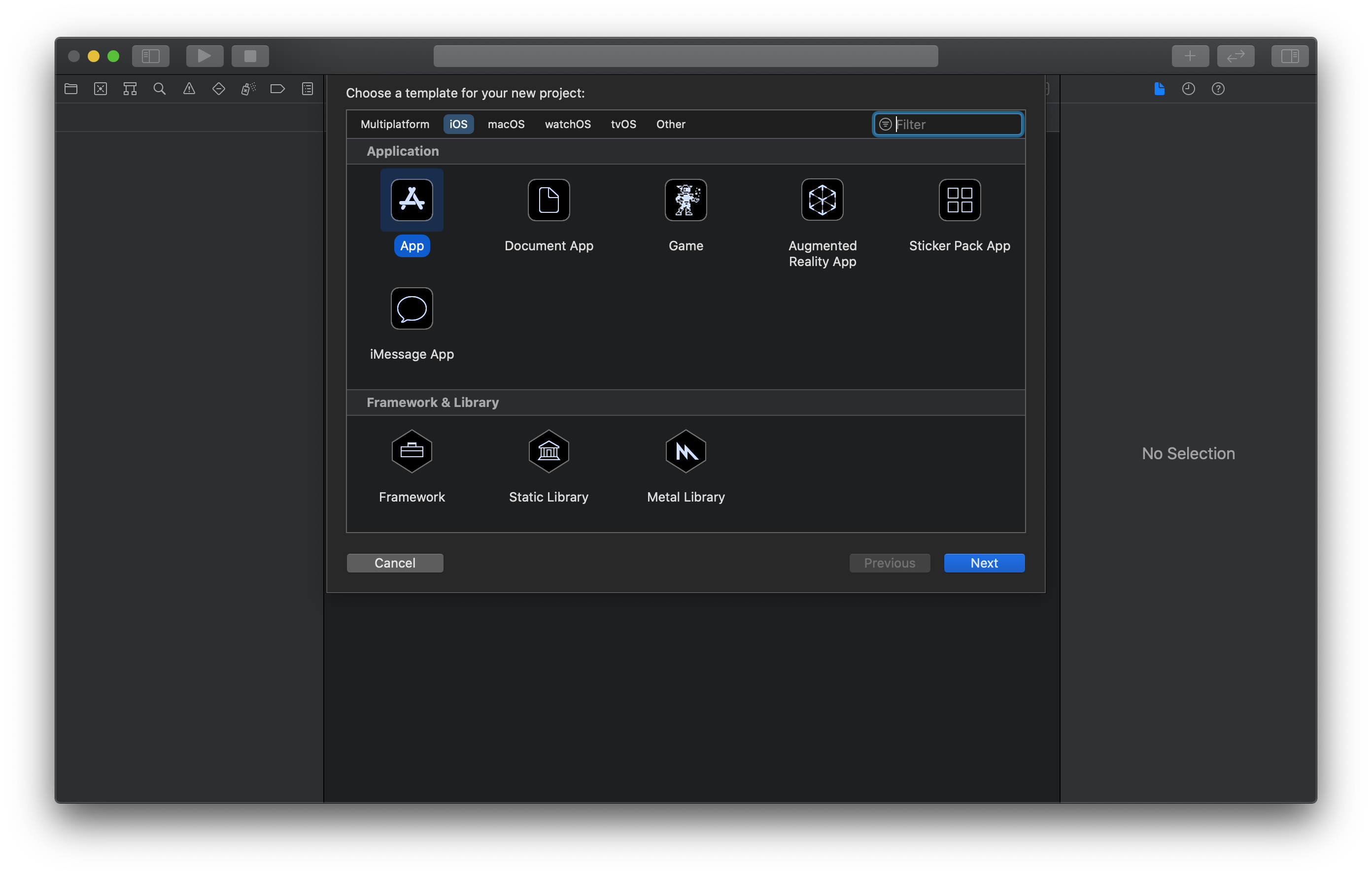
ContentView를 보도록 하자.
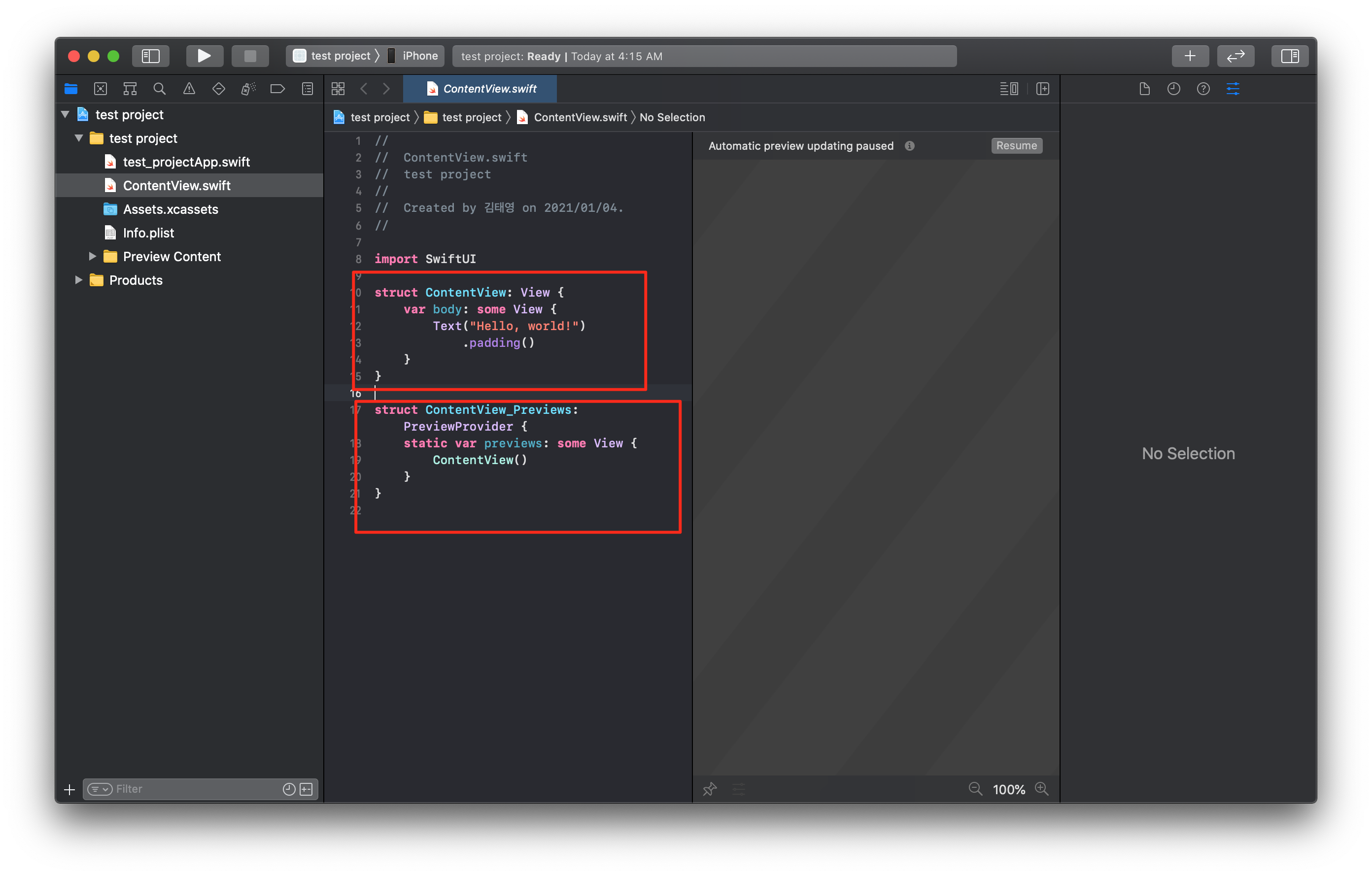
저 코드를 가져와보겠다.
import SwiftUI

struct ContentView: View {
    var body: some View {
        Text("Hello, world!")
            .padding()
    }
}

struct ContentView_Previews: PreviewProvider {
    static var previews: some View {
        ContentView()
    }
}
ContentView라는 struct가 이제 눈에 들어올 것이다. 그리고 body라는 property도 가지고 있음을 알 수 있다. 아직 모르는 부분은 넘어가자. 겁먹지 말자. 곧 배운다.
body라는 property는 computed property로 값 형태가 아닌 계산된 값을 내놓는 형태로 되어있다.
ContentView 뒤에 콜론(:) 그리고 View라는 키워드가 있다. 이것은 타입을 명시하는 것이 아니다. protocol을 의미한다. protocol은 규약을 의미한다. 즉, ContentView는 View라는 protocol(규약)을 따르고 있다고 생각하면 된다.
protocol의 이해를 돕기 위해 설명을 해보자.
화재 비상에 대한 protocl이 있다고 가정하자. 빌딩은 불이 날 때 어떻게 해야 되는지 알기 위해 이 protocol을 가지고 있을 것이다. 혹은 건축업자들은 집을 안전하게 하기 위해서 이 protocol을 가지고 있을 것이다.
swift에서도 마찬가지로 여러 protocol들이 있다. 위 코드에서는 ContentView라는 struct가 View라는 protocol을 따르고 있다. 그리고 지키지 않으면 에러를 내뱉을 것이다,
View라는 protocol은 body property를 가지고 있어야 되며 이 body property는 어떠한 view를 리턴해야 된다는 규약이고, ContentView는 이 View protocol을 지키고 있다.
body property는 View protocol을 지키는 어떠는 값이라도 리턴할 수 있다. body property는 computed property로 한 줄 코드이기 때문에 return은 생략할 수 있다.
에디터 상에서 Text를 클릭하고 인스펙터에서 ?표시된 곳을 클릭하면 help창을 볼 수 있다.
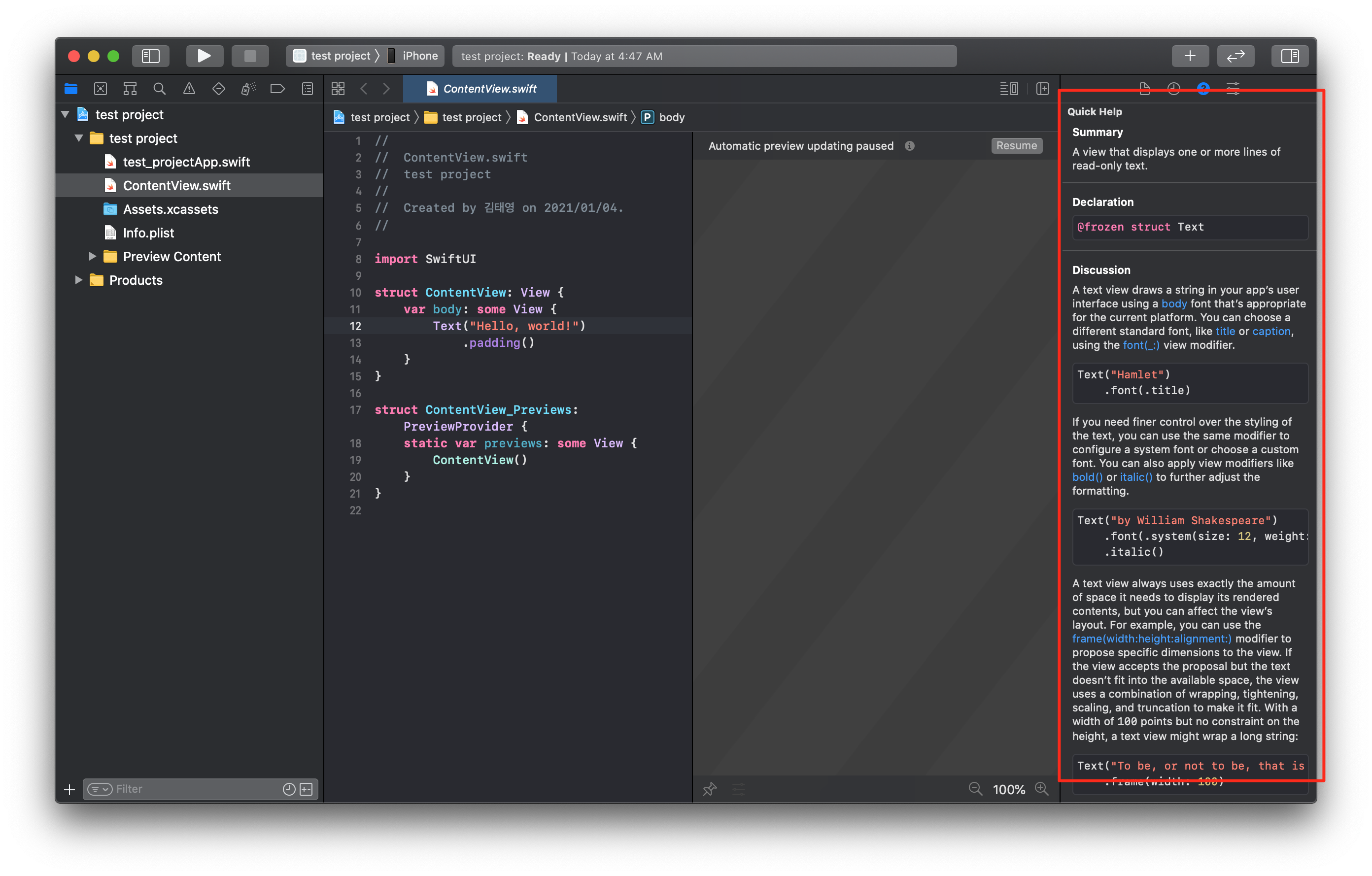
Text도 struct임을 알 수 있다. 그런데 우리가 한 것과 다르게 괄호안에 값을 넣어주고 있다. 실은 값을 넣어줄 수 있다. 이 값을 통해서 instance를 다르게 만들 수 있는데 이것을 initialism이라고 한다. 일단 나중에 다시 자세히 다뤄보자. 일단 이러한 방법이 있다는 것만 알아두자.
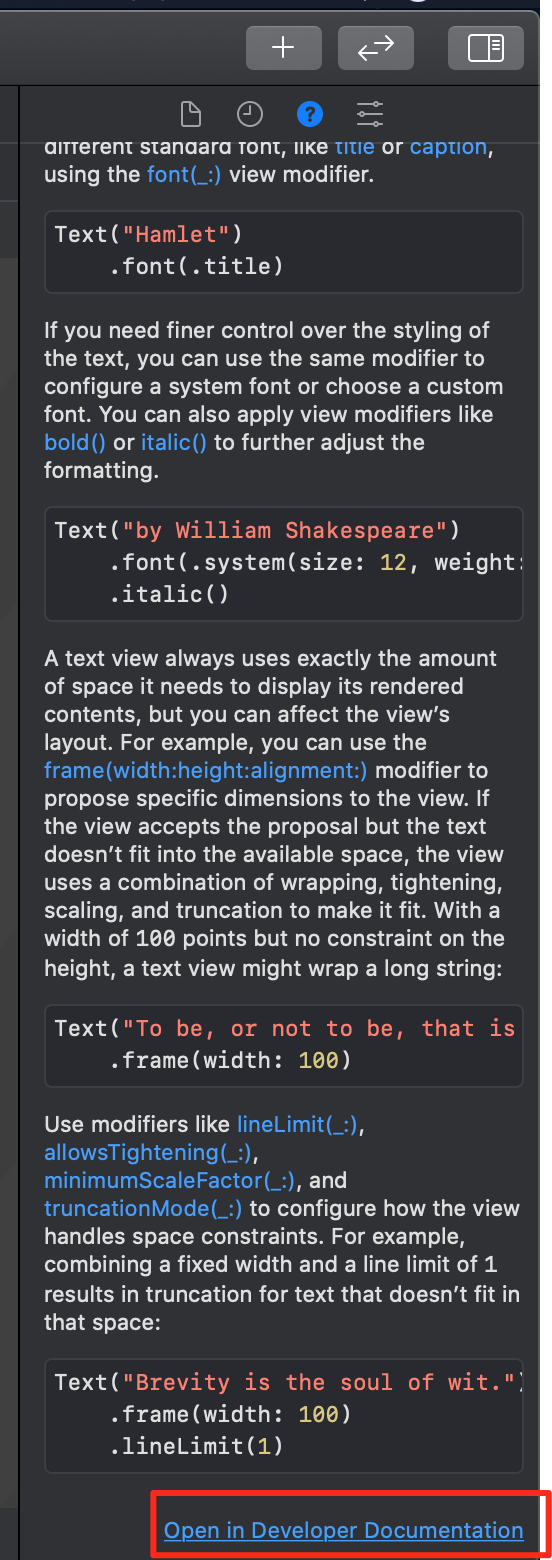
인스펙터의 최하단에 Open in Developer Documentation을 클릭해보자.
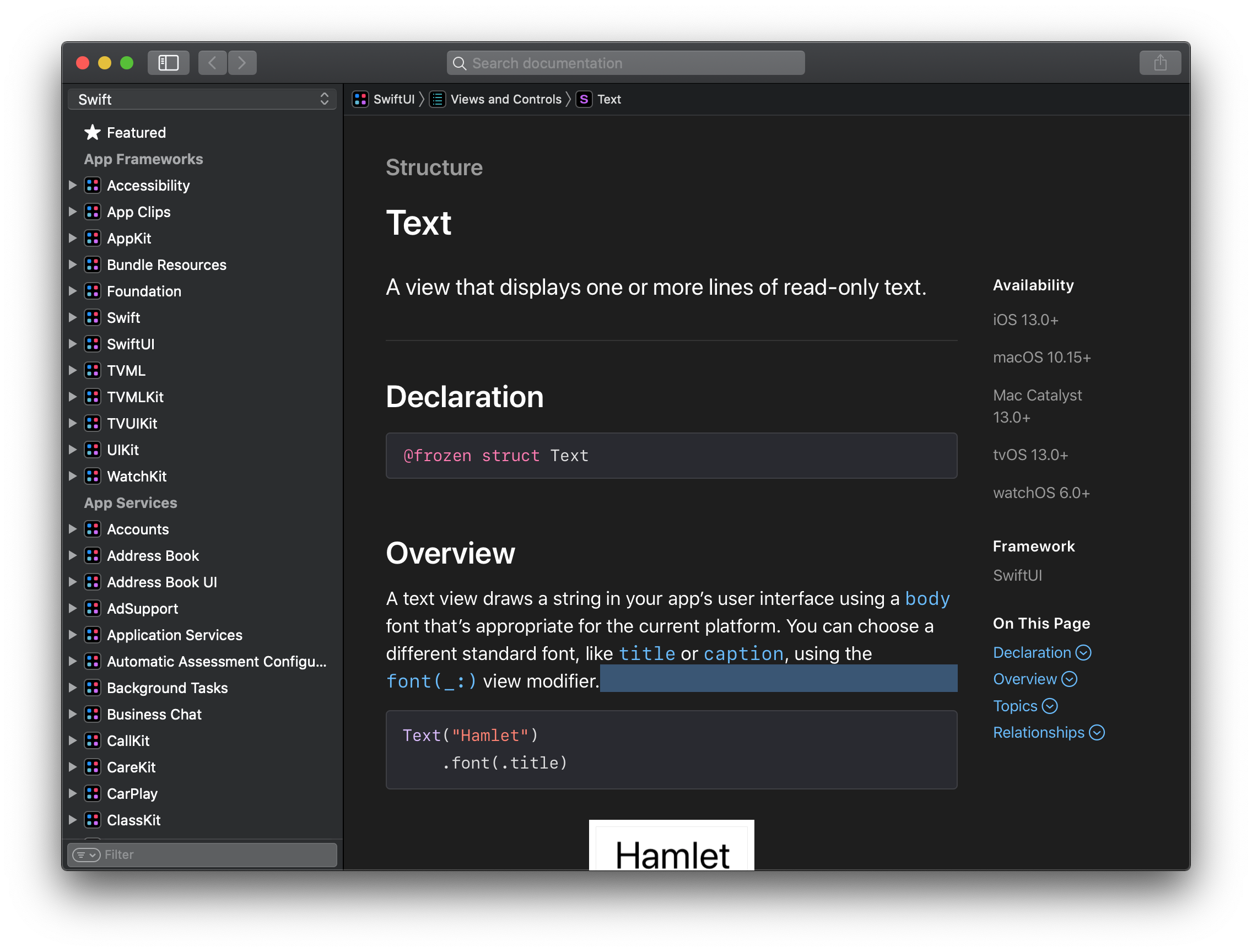
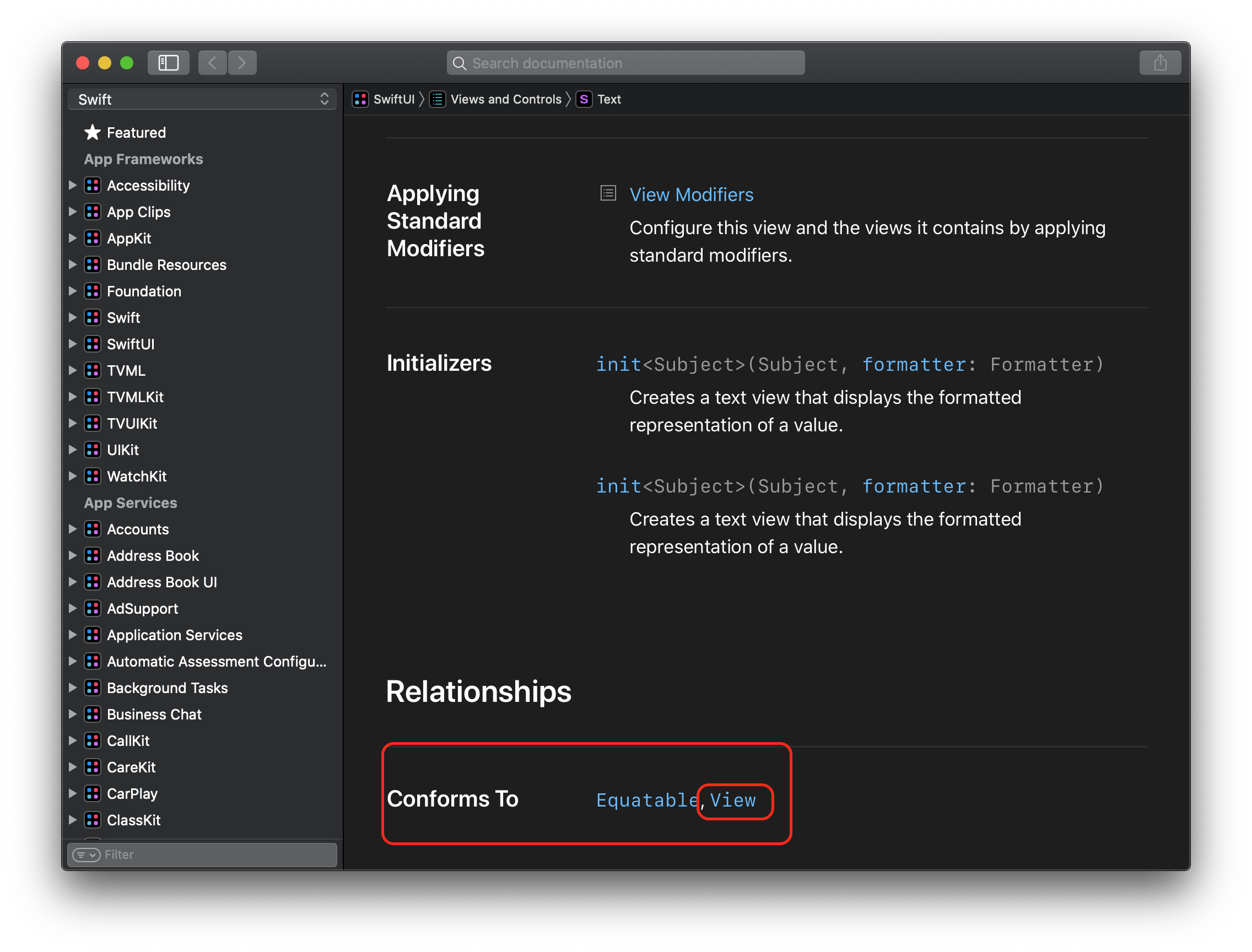
중앙의 영억에서 제일 하단으로 내려가보면 Confirm To에 View가 있는 것을 확인할 수 있다. View protocol을 지킨다는 뜻이겠다.
다시 코드를 살펴보자. 코드 중 Text("Hello, world").padding() 부분을 자세히 살펴보자.
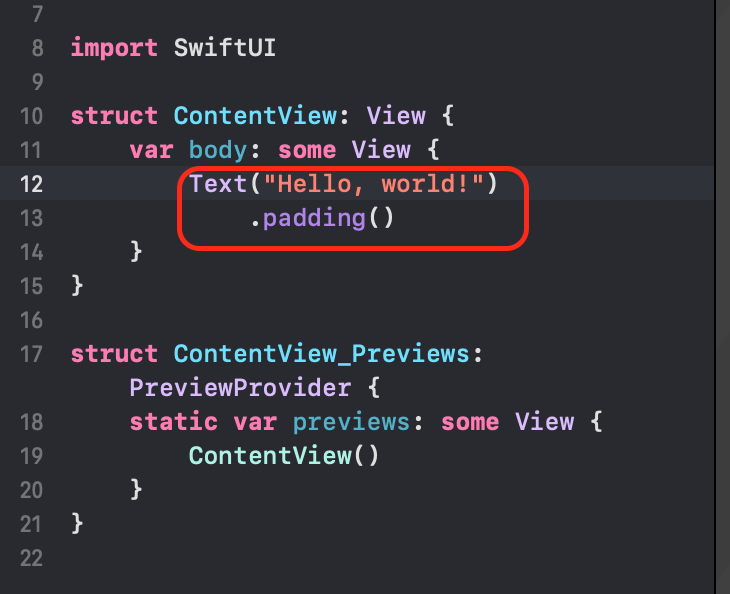
Text라는 struct에서 padding메소드를 부르고 있는 것이다.
일단 struct는 보았고 이 struct는 instance를 생성해야 의미가 있다. 그럼 이 instance는 어디에 있을까.
메인 파일(나의 경우는 text_projectApp.swift)에 들어가면 다음과 같이 뜰 것이다.
//
//  test_projectApp.swift
//  test project
//
//  Created by 김태영 on 2021/01/04.
//

import SwiftUI

@main
struct test_projectApp: App {
    var body: some Scene {
        WindowGroup {
            ContentView()
        }
    }
}
test_projectApp도 struct인 것을 확인할 수 있다. App이라는 protocol을 따르고 있다. help창을 켜면 어떤 protocol인지 자세히 알 수 있다. 그리고 App protocol대로 body라는 computed property를 property로 가지고 있다. 그리고 protocol대로 WindowGroup이라는 container로 묶어 ContentVeiw의 instance를 생성하는 것을 볼 수 있다.
다시 ContentView로 돌아가자
.
//
//  ContentView.swift
//  test project
//
//  Created by 김태영 on 2021/01/04.
//

import SwiftUI

struct ContentView: View {
    var body: some View {
        Text("Hello, world!")
            .padding()
    }
}

struct ContentView_Previews: PreviewProvider {
    static var previews: some View {
        ContentView()
    }
}
ContentView_Previews도 struct임을 알 수 있는데 이는 앱을 위해서 있는 struct가 아닌 미리보기(preview)를 위한 struct이다. 이 struct 역시 protocol을 따르고 있다. previews라는 computed property가 있는데 그 안에 있는 ContentView는 struct를 통해 만들어진 instance이다. 여기에 modifier를 추가할 수 있다.(method를 호출) preview화면에서 darkmode로 바꾸거나 기기를 변경하면 해당 method가 호출되는 것을 볼 수 있다.

preview를 복제하면 Group Container로 묶인 두 개의 ContentView를 발견할 수 있다. 이 또한 View의 protocol을 지키고 있을 것이다.
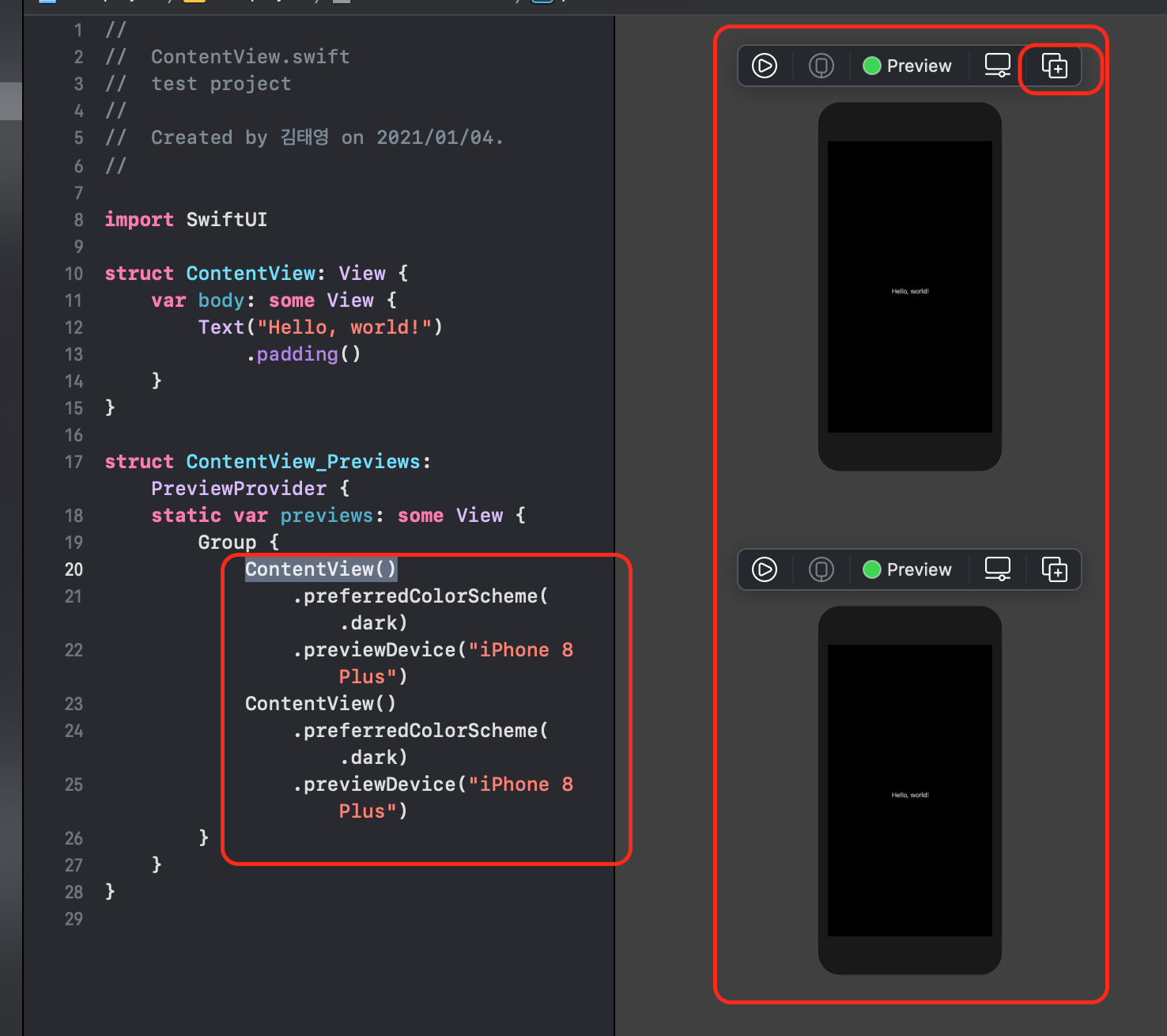
각각의 ContenView는 별개로 modifier를 수정하더라도 다른 ContentView에는 영향을 주지 않는다.
이제 배운 것들을 토대로 문제를 풀어보도록 하자.
Challenge 1
Declare a struct called TaxCalculator
Declare a property inside called tax and set it to a decimal value representing the amount of sales tax where you live
Declare a method inside called totalWithTax that accepts a Double as an input parameter and returns a Double value.
Inside that method, write the code to return a Double value representing the input number with tax included
영알못을 위해 어설픈 해석을 하자면
TexCalculator라는 struct를 선언해라.
tax라는 property를 선언하고, 당신이 살고 있는 곳의 세금을 표시해라
totalWithTax라는 method를 선언하라. 이 method는 Double로 된 값을 받아서 Double로 된 값을 return 한다.
그리고 method안에는 double값을 받아서 tax를 포함하는 값을 return 하도록 해라.
스스로 해보고 아래 솔루션을 펼쳐 보도록 하자.
struct TaxCalculator {
  let tax:Double = 0.1
  func totalWithTax(input : Double) -> Double {
    return input + (input * tax)
  }
}
Challenge 2
Declare a struct called BillSplitter
Declare a method inside called splitBy that:
- has an input parameter of type Double representing a subtotal
- has an input parameter of type Int representing the number of people
- returns a Double value
Inside that method, use an instance of TaxCalculator (from challenge 1 above) to calculate the total with tax and then split the bill by the number of people passed into the method.
Return the amount that each person has to pay.
BillSplitter라는 struct는 선언하고, 그 안에 splitBy라는 method를 선언하도록 해라.
- 이 메소드는 소계를 나타내는 Double타입의 값을 parameter로 갖는다
- 이 메소드는 사람들의 숫자를 나타내는 Int 타입의 값을 parameter로 갖는다
- Double 타입의 값을 return 한다.
메소드 안에서는 Challenge 1에서 선언했던 TaxCalculator의 instance를 사용해서 전체 세금을 계산하고 method의 parmeter로 받은 사람들의 수만큼 나누고 그 값을 return 하도록 한다.
이것도 혼자서 해보고 아래 솔루션을 보도록 하자.
struct BillSplitter {
  func splitBy( subTotal : Double, numberOfPeople : Int ) -> Double {
    let taxCal = TaxCalculator()
    return taxCal.totalWithTax(input : subTotal) / Double(numberOfPeople) // Double값을 나누기 위해서는 Double로 나누어야 되기 때문에 Int 값을 Double로 변경
  }
}
Challenge 3
Create an instance of BillSplitter
Use the instance to print out the amount that each person pays (Assuming 5 people with a bill of $120)
BillSplitter의 instance를 만들고, 이 instance를 사용하여 사람마다 내야 할 돈을 출력해보자. ( 5명이고 120달러라 가정하자.)
마찬가지로 혼자서 해보고 설루션을 보도록 하자
let numberOfPeople : Int = 5
let subTotal:Double = 120
let billSplitter = BillSplitter()
let oneHasToPay = billSplitter.splitBy(subTotal : subTotal, numberOfPeople : numberOfPeople )
print(oneHasToPay)
이로써 instance를 만드는 것, moethod를 호출, access levels 등에 대해 알아보았다. 끝!
'14일 만에 아이폰 앱 만들기' 카테고리의 다른 글
| 14일 만에 아이폰 앱 만들기(11) - State Properties (0) | 2021.01.11 |
|---|---|
| 14일 만에 아이폰 앱 만들기 챌린지(10) - SwiftUI Buttons (0) | 2021.01.10 |
| 14일 만에 아이폰 앱 만들기 챌린지(8) - Structures (0) | 2021.01.08 |
| 14일 만에 아이폰 앱 만들기 챌린지(7) - 스위프트 함수 (0) | 2021.01.07 |
| 14일 만에 아이폰 앱 만들기 챌린지(6) - 데이터 타입, 변수, 상수 (1) | 2021.01.06 |

